 thingiverse
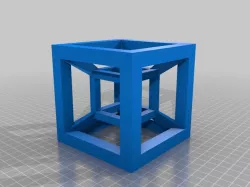
Parametric Hypercube
This is my first experience with OpenSCAD and was made as an experiment, if anyone finds it useful then that's a bonus!
This is a derivative work of A cube by imaterialise.
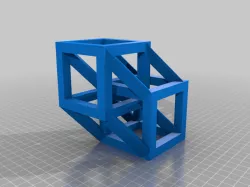
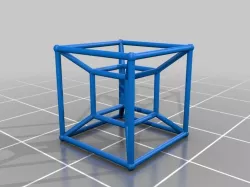
A hypercube is a "shadow" or projection of a 4 dimensional cube in 3d space; much like if you projected a 3d cube onto a 2d surface. If you're interested in the theory behind this then please consult wikipedia as I don't really understand it... looks cool though ;).
I have parameterised this to enable customisation of the size of the inner and outer cubes and the thickness of the "lines" for the inner and outer cubes. You will also notice that the polyhedrons connecting the two cubes have triangular cross-sections; this was mainly for ease of coding (less polygons to orientate!), but also seemed neat to me at the time.
(note: this is my first OpenSCAD thing so I'm not sure about the neatness and robustness of my code so any feedback would be greatly apreciated!)
Instructions
Input parameters to the top of the code where indicated
Compile and generate g-code
Print and clean up
I don't know if this thing is actually printable as I'm still a way off finishing my RepRap (but I suspect a smaller overall dimension will give a better print). If anyone fancies giving it a go then that would be fantastic! As ever feedback is greatly appreciated.
Note: printing a true 4D cube will require a 4D printer and extra-dimensional perception (not included);).
Direct link to the original creator's page
Also Available On
More from brucey
Similar Models
 thingiverse
 thingiverse
 cults3d
 thingiverse
 thingiverse
 thingiverse
 thingiverse
 myminifactory
Model Specifications
Frequently Asked Questions
How do I download Parametric Hypercube?
Click the "View on thingiverse" button above to visit the original model page on thingiverse. You can download the STL file directly from the creator's page for free.
What 3D printer can I use for this model?
This STL file is compatible with most FDM 3D printers (Creality Ender 3, Prusa MK3S+, Bambu Lab, etc.) and resin printers (Elegoo, Anycubic). Check the original page for recommended print settings and materials.
Is this 3D model free to download?
Yes, this model is available as a free download on thingiverse. Some creators accept tips or donations.
Can I modify this STL file?
Most STL files can be modified using free software like Blender, TinkerCAD, or Meshmixer. Check the license on the original thingiverse page to see if modifications are permitted by the creator.